
Installing Gentoo on Orange Pi Zero 2W
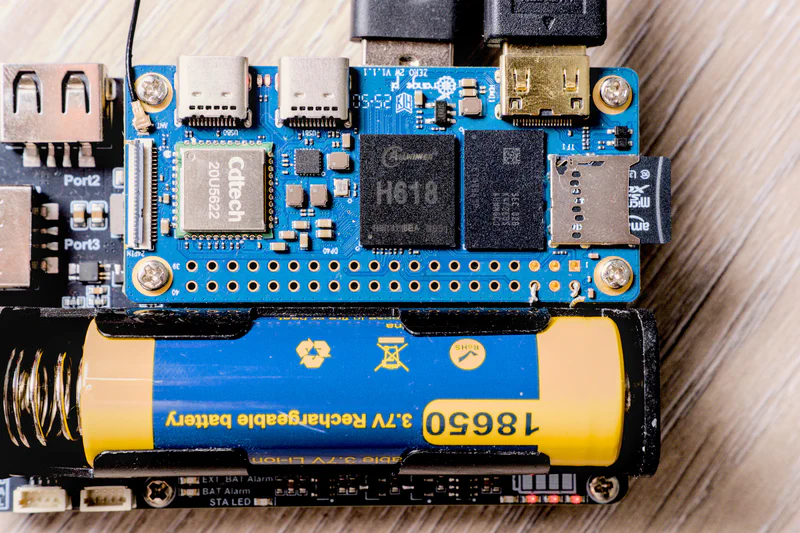
Orange Pi Zero 2W, running with Pi Zero UPS HUB HAT, powered by a single 18650 battery
Orange Pi Zero 2W - purchased.
Armbian - easy.
Gentoo, let’s go.
Start with Armbian
Before even starting with Gentoo, download the Armbian image, install preferably on a separate micro SD card, and make sure the Orange Pi Zero 2W is working as expected.
This Armbian installation has been important to research and come up with this guide. But other than that, it is not a dependency of the resulted guide.
My Raspberry Pi 5 (8GB version) is an important dependency here. It helps avoiding Qemu or cross-compilation.
Follow Gentoo AMD64 Handbook
To follow this guide, simultaneously Gentoo AMD64 Handbook should be open in a near browser tab.
Sections below are named after the corresponding Gentoo AMD64 Handbook chapters. These are mostly suggestions on top of the Gentoo handbook.
Preparing the disks
Insert the micro SD card in the Pi 5, and jump straight to Preparing the disks.
The corresponding block device here is /dev/sdb since I am using a USB adapter.
So,
Boot and root partitions
 1fdisk /dev/sdb
 2
 3Welcome to fdisk (util-linux 2.42.2).
 4Changes will remain in memory only, until you decide to write them.
 5Be careful before using the write command.
 6
 7
 8Command (m for help): o
 9Created a new DOS (MBR) disklabel with disk identifier 0x0b13b38d.
10
11Command (m for help): n
12Partition type
13   p   primary (0 primary, 0 extended, 4 free)
14   e   extended (container for logical partitions)
15Select (default p): p
16Partition number (1-4, default 1): 1
17First sector (2048-123596799, default 2048): 8192
18Last sector, +/-sectors or +/-size{K,M,G,T,P} (8192-123596799, default 123596799): +1G
19
20Created a new partition 1 of type 'Linux' and of size 1 GiB.
21
22Command (m for help): p
23Disk /dev/sdb: 58.94 GiB, 63281561600 bytes, 123596800 sectors
24Disk model: USB3.0 CRW   -SD
25Units: sectors of 1 * 512 = 512 bytes
26Sector size (logical/physical): 512 bytes / 512 bytes
27I/O size (minimum/optimal): 512 bytes / 512 bytes
28Disklabel type: dos
29Disk identifier: 0x0b13b38d
30
31Device     Boot Start     End Sectors  Size Id Type
32/dev/sdb1        8192 2105343 2097152    1G 83 Linux
33
34Command (m for help): n
35Partition type
36   p   primary (1 primary, 0 extended, 3 free)
37   e   extended (container for logical partitions)
38Select (default p): p
39Partition number (2-4, default 2): 2
40First sector (2048-123596799, default 2048): 2105344
41Last sector, +/-sectors or +/-size{K,M,G,T,P} (2105344-123596799, default 123596799):
42
43Created a new partition 2 of type 'Linux' and of size 57.9 GiB.
44
45Command (m for help): p
46Disk /dev/sdb: 58.94 GiB, 63281561600 bytes, 123596800 sectors
47Disk model: USB3.0 CRW   -SD
48Units: sectors of 1 * 512 = 512 bytes
49Sector size (logical/physical): 512 bytes / 512 bytes
50I/O size (minimum/optimal): 512 bytes / 512 bytes
51Disklabel type: dos
52Disk identifier: 0x0b13b38d
53
54Device     Boot   Start       End   Sectors  Size Id Type
55/dev/sdb1          8192   2105343   2097152    1G 83 Linux
56/dev/sdb2       2105344 123596799 121491456 57.9G 83 Linux
57
58Command (m for help): w
59The partition table has been altered.
60Calling ioctl() to re-read partition table.
61Syncing disks.
The block below hides the output text from fdisk to make following the inputs easier.
 1fdisk /dev/sdb
 2Command (m for help): o
 3Command (m for help): n
 4Select (default p): p
 5Partition number (1-4, default 1): 1
 6First sector (2048-123596799, default 2048): 8192
 7Last sector, +/-sectors or +/-size{K,M,G,T,P} (8192-123596799, default 123596799): +1G
 8Command (m for help): n
 9Select (default p): p
10Partition number (2-4, default 2): 2
11First sector (2048-123596799, default 2048): 2105344
12Last sector, +/-sectors or +/-size{K,M,G,T,P} (2105344-123596799, default 123596799):
Formatting the boot partition
 1mkfs.ext4 /dev/sdb1
 2mke2fs 1.47.4 (6-Mar-2025)
 3Creating filesystem with 262144 4k blocks and 65536 inodes
 4Filesystem UUID: 74b41c0c-13dc-468a-a784-e728b37b8f34
 5Superblock backups stored on blocks:
 6	32768, 98304, 163840, 229376
 7
 8Allocating group tables: done
 9Writing inode tables: done
10Creating journal (8192 blocks): done
11Writing superblocks and filesystem accounting information: done
Creating ZFS pool on the root partition
1ls -l /dev/disk/by-id | grep b2
2lrwxrwxrwx 1 root root 10 Aug 29 13:37 usb-Generic-_USB3.0_CRW_-SD_201404081410-0:1-part2 -> ../../sdb2
3
4zpool create -f -o ashift=12 -O mountpoint=none -O relatime=on -O atime=on -O acltype=posixacl -O xattr=sa -O aclinherit=passthrough -O compression=lz4 -m none orangetoo /dev/disk/by-id/usb-Generic-_USB3.0_CRW_-SD_201404081410-0:1-part2
5
6zfs create -o mountpoint=/mnt/gentoo orangetoo/root
U-Boot/SPL
Below, git clone and any build commands are done as non root user.
ARM trusted firmware
The actual chip is h618, but below the platform of choice is h616 for this build.
1git clone https://github.com/ARM-software/arm-trusted-firmware.git
2cd arm-trusted-firmware
3make PLAT=sun50i_h616 DEBUG=0 CROSS_COMPILE=aarch64-unknown-linux-gnu- bl31
4cd ..
The part above CROSS_COMPILE=aarch64-unknown-linux-gnu- is related to CHOST="aarch64-unknown-linux-gnu" parameter specified in /etc/portage/make.conf of the Pi 5 Gentoo installation.
U-Boot
1git clone https://source.denx.de/u-boot/u-boot.git
2cd u-boot
3make orangepi_zero2w_defconfig
4export BL31=$HOME/arm-trusted-firmware/build/sun50i_h616/release/bl31.bin
5make
6cd ..
There is the file u-boot-sunxi-with-spl.bin, proceed to copying it to the micro SD card, from the root shell.
1dd if=u-boot-sunxi-with-spl.bin of=/dev/sdb bs=512 seek=16 conv=fsync,notrunc status=progress
2sync
Gentoo installation files
Now that the disk is prepared, go to Installing the Gentoo installation files.
Preparing an AArch64 installation from another AArch64 host device follows almost identically to the AMD64 guide.
Download and extract the desired arm64 stage file as per the instructions.
This is the desired /etc/portage/make.conf file. The important specific bits are -mcpu=cortex-a53+crc+crypto and VIDEO_CARDS="panfrost".
mcpu=native while on Pi 5. In that case it would later not work on Orange Pi Zero 2W. 1COMMON_FLAGS="-mcpu=cortex-a53+crc+crypto -O2 -pipe"
2CFLAGS="${COMMON_FLAGS}"
3CXXFLAGS="${COMMON_FLAGS}"
4FCFLAGS="${COMMON_FLAGS}"
5FFLAGS="${COMMON_FLAGS}"
6
7CHOST="aarch64-unknown-linux-gnu"
8
9LC_MESSAGES=C.UTF-8
10
11MAKEOPTS="-j4"
12PORTAGE_NICENESS="19"
13PORTAGE_IONICE_COMMAND="ionice -c 3 -p \${PID}"
14FEATURES="${FEATURES} getbinpkg binpkg-request-signature"
15VIDEO_CARDS="panfrost"
16USE="${USE} elogind X egl gles1 gles2 bluetooth"
Then, for the package.use, have this
1*/* CPU_FLAGS_ARM: edsp neon neon-fp16 thumb vfp vfpv3 vfpv4 vfp-d32 aes sha1 sha2 crc32 asimd v4 v5 v6 v7 v8 thumb2
cpuid2cpuflags is not there yet on this step. It is ok to postpone this configuration, and have it installed during the base system installation.As for
resolve-march-native, it is not packaged for Armbian, but one can use the Github repository directly, and obtain the mcpu value while running the Armbian image, before starting with Gentoo installation.Whatever. The relevant values are already provided.
Gentoo base system
Not much different than Installing the Gentoo base system.
During this step, in chroot environment, when the guide is suggesting to install cpuid2cpuflags, do the below command instead.
1emerge -avUDUNt --with-bdeps=y @world app-misc/resolve-march-native app-shells/bash-completion sys-kernel/dracut app-editors/vim app-portage/cpuid2cpuflags app-misc/mc sys-fs/dosfstools sys-apps/usbutils sys-apps/pciutils sys-apps/lshw net-wireless/wpa_supplicant net-wireless/iw net-dns/bind app-portage/gentoolkit dev-embedded/u-boot-tools net-misc/chrony sys-process/htop sys-kernel/linux-firmware sys-kernel/gentoo-sources
2rc-update add chronyd
zfs will be installed after the kernel is configured.
emerge is doing its thing, take a photograph of the little computer, mounted on top of UPS, purchased from Amazon. This is not only a UPS, but also a USB hub.Armbian Patches
Process outline
This stuff is specific to Linux 6.18, and is optional. If I skip this section entirely, the successfull installation boots the board without HDMI, Wi-Fi, Bluetooth, not even the green LED heartbeat, and probably many other goods.
This section will clone the armbian/build repository as root, and will run the patching python script to essentially patch the /usr/src/linux.
A little insight on Armbian structure.
The relevant root configuration file config/boards/orangepizero2w.csc specifies
1BOARDFAMILY="sun50iw9"
2KERNEL_TARGET="current,edge"
3enable_extension "uwe5622-allwinner"
As seen below, the kernel target current refers to 6.18, which I am after here.
Subsequently, the configuration config/sources/families/sun50iw9.conf does not explicitly specify the LINUXFAMILY, but includes config/sources/families/include/sunxi64_common.inc, which in turn has these definitions
1KERNEL_MAJOR_MINOR="6.18" # for the `current` target
2KERNELPATCHDIR="archive/sunxi-${KERNEL_MAJOR_MINOR}"
3LINUXFAMILY=sunxi64
These are used below, when calling the patcher script.
The Armbian build will use the bash script lib/functions/compilation/kernel-patching.sh which then calls the
lib/tools/patching.py. I will call this python script directly here.
But before starting the whole Armbian patch, I need to replicate what is being done in lib/functions/compilation/patch/drivers_network.sh, function driver_uwe5622(). Not only that, I didn’t exactly find how it is referenced in armbian/build, but armbian/firmware is another dependency.
Let us do it.
Unisoc wireless firmware and driver
1cd /usr/src/
2git clone https://github.com/armbian/firmware/
3cd firmware
4rm -rf /lib/firmware/uwe5622
5mkdir -p /lib/firmware/uwe5622
6cp uwe5622/wcnmodem.bin /lib/firmware/uwe5622/
7cp uwe5622/wifi_2355b001_1ant.ini /lib/firmware/
1cd /usr/src/
2git clone https://github.com/armbian/uwe5622
3cd uwe5622
4git checkout d6bec7538a0b4b67e35715ad71eaa056555524cb
5rm -rf /usr/src/linux/drivers/net/wireless/uwe5622
6mkdir /usr/src/linux/drivers/net/wireless/uwe5622
7cp -R ./{tty-sdio,unisocwcn,unisocwifi,Kconfig,Makefile} /usr/src/linux/drivers/net/wireless/uwe5622/
8echo "obj-\$(CONFIG_SPARD_WLAN_SUPPORT) += uwe5622/" >> /usr/src/linux/drivers/net/wireless/Makefile
9sed -i '/source "drivers\/net\/wireless\/ti\/Kconfig"/a source "drivers\/net\/wireless\/uwe5622\/Kconfig"' /usr/src/linux/drivers/net/wireless/Kconfig
1mkdir /etc/modules-load.d
2printf "sprdwl_ng\nsprdbt_tty\n" > /etc/modules-load.d/unisoc-wireless.conf
Then, the following is a generic piece, but to have a Wi-Fi connection upon the first boot, paste this to /etc/conf.d/net
1modules_wlan0="wpa_supplicant"
2config_wlan0="dhcp"
3wpa_supplicant_wlan0="-i wlan0 -c /etc/wpa_supplicant/wpa_supplicant.wlan0.conf"
Have an appropriate piece in /etc/wpa_supplicant/wpa_supplicant.wlan0.conf
1ctrl_interface=DIR=/var/run/wpa_supplicant GROUP=wheel
2
3network={
4	ssid="orangetoowlanssid"
5	#psk="1234567890"
6	psk=b0d50da562f9cf92c72edc4bb012be65464f8570077eb9c89ccee6fec82a38ee
7}
And enable the net.wlan0 service
1ln -s /etc/init.d/net.lo /etc/init.d/net.wlan0
2rc-update add net.wlan0
Armbian
1cd /usr/src
2git clone --depth 1 https://github.com/armbian/build
3cd build/
4ln -s ../linux ./linux
Edit the file lib/tools/patching.py,
find the section around line 264
1if apply_patches:
2	log.debug("Cleaning target git directory...")
3	git_repo = Repo(GIT_WORK_DIR, odbt=GitCmdObjectDB)
4	...
Remove, or comment all lines involving git or git status checks. The result will look like below
1if apply_patches:
2	log.debug("Cleaning target git directory...")
3	GIT_WORK_DIR_REL_SRC = os.path.relpath(GIT_WORK_DIR, SRC)
4
5	# the autopatcher params
6	autopatcher_params: dt_makefile_patcher.AutoPatcherParams = dt_makefile_patcher.AutoPatcherParams(
7		pconfig, GIT_WORK_DIR, CONST_ROOT_TYPES_CONFIG_ORDER, ROOT_DIRS_BY_ROOT_TYPE, apply_patches_to_git, git_repo
8	)
After patching the patcher script, a little sanity, create and activate python virtual environment to continue
1python -m venv .venv
2source .venv/bin/activate
3pip install -r requirements.txt
Push the little red button!
 1SRC="$PWD" \
 2PATCH_TYPE=kernel \
 3PATCH_DIRS_TO_APPLY="archive/sunxi-6.18" \
 4KERNELPATCHDIR="archive/sunxi-6.18" \
 5KERNEL_MAJOR_MINOR="6.18" \
 6USERPATCHES_PATH="$PWD/userpatches" \
 7APPLY_PATCHES=yes \
 8PATCHES_TO_GIT=no \
 9REWRITE_PATCHES=no \
10REWRITE_PATCHES_NEEDING_REBASE=no \
11GIT_WORK_DIR="$PWD/linux" \
12LINUXFAMILY=sunxi64 \
13PARALLEL_PATCHES=no \
14ALLOW_RECREATE_EXISTING_FILES=yes \
15GIT_ARCHEOLOGY=no \
16FAST_ARCHEOLOGY=yes \
17python3 "$PWD/lib/tools/patching.py"
It is strange, but I had no patching errors. None.
Now copy over the kernel config, and deactivate the python virtual environment.
1cp config/kernel/linux-sunxi64-current.config ./linux/.config
2deactivate
The kernel, modules, initramfs
Kernel
This chapter has additions to Configuring the Linux kernel.
If the Armbian Patch section has not been skipped, then the kernel configuration file is already present. Otherwise get it from the armbian/build repository and save as /usr/src/linux/.config.
Then,
1cd /usr/src/linux
2make olddefconfig
will adjust the kernel configuration to the current (mainline or possibly patched) kernel.
Then,
1make -j4
2make modules_prepare
3make modules_install
4make dtbs
5make install
6make dtbs_install
ZFS
Have the following in package.use
1sys-fs/zfs -initramfs
and,
1emerge -av zfs
2
3rc-update add zfs-import boot
4rc-update add zfs-mount boot
5rc-update add zfs-share default
6rc-update add zfs-zed default
Initramfs
1dracut --kver 6.18.48-gentoo --force -v --force-drivers "zfs spl sunxi_mmc mmc_core mmc_block"
Tried below two options with no success.
#dracut -H --kver 6.18.48-gentoo --force --hostonly-mode strict -v --omit "kernel-modules-extra"
#dracut -H --kver 6.18.48-gentoo --force -v
Below are some, older experiments. Probably unsuccessfull again.
#dracut -H --kver 6.18.35-gentoo-r1 --force --hostonly-mode strict -v --force-drivers "zfs spl sunxi_mmc mmc_core mmc_block"
#dracut --kver 6.18.35-gentoo-r1 --force -v --force-drivers "zfs spl sunxi_mmc mmc_block mmc_core dw_mmc dw_mmc-pltfm stmmac dwmac_sun8i phylink"
Boot partition
 1ls -l /boot /boot/dtbs/6.18.48-gentoo/allwinner/sun50i-h618-orangepi-zero2w.dtb
 2
 3-rw-r--r-- 1 root root 21710 Aug 29 20:40 /boot/dtbs/6.18.48-gentoo/allwinner/sun50i-h618-orangepi-zero2w.dtb
 4
 5/boot:
 6total 32455
 7-rw-r--r-- 1 root root  5787966 Aug 29 20:39 System.map-6.18.48-gentoo
 8-rw-r--r-- 1 root root      354 Aug 29 21:08 boot.cmd
 9-rw-r--r-- 1 root root      426 Aug 29 21:09 boot.scr
10drwxr-xr-x 3 root root        3 Aug 29 20:40 dtbs
11-rw------- 1 root root 14438068 Aug 29 21:51 initramfs-6.18.48-gentoo.img
12-rw-r--r-- 1 root root 28609024 Aug 29 20:39 vmlinux-6.18.48-gentoo
Have the following in /boot/boot.cmd
 1setenv bootargs 'console=ttyS0,115200 root=ZFS=orangetoo/root rw'
 2
 3load mmc 0:1 ${kernel_addr_r} vmlinux
 4load mmc 0:1 ${fdt_addr_r} sun50i-h618-orangepi-zero2w.dtb
 5load mmc 0:1 ${ramdisk_addr_r} initramfs.img
 6
 7booti ${kernel_addr_r} ${ramdisk_addr_r}:${filesize} ${fdt_addr_r}
 8
 9# Recompile with:
10# mkimage -C none -A arm64 -T script -d boot.cmd boot.scr
And as the last comment of this file asks, create the boot.scr
1mkimage -C none -A arm64 -T script -d boot.cmd boot.scr
Finally, copy the necessary files actually to the boot partition.
1mkdir /uboot
2mount /dev/sdb1 /uboot/
3cp /boot/boot.cmd /uboot/
4cp /boot/boot.scr /uboot/
5cp /boot/initramfs-6.18.48-gentoo.img /uboot/initramfs.img
6cp /boot/vmlinux-6.18.48-gentoo /uboot/vmlinux
7cp /boot/dtbs/6.18.48-gentoo/allwinner/sun50i-h618-orangepi-zero2w.dtb /uboot/
8umount /uboot
This other one, is a more elaborate version of boot.cmd
 1# Make sure U-Boot's own text output (not just the OS's) goes to HDMI too
 2setenv stdout serial,vidconsole
 3setenv stderr serial,vidconsole
 4
 5# If your U-Boot binary is Armbian's (with the legacy display driver),
 6# it needs this to bring up HDMI at all — mainline U-Boot ignores it harmlessly.
 7setenv disp_mode "1920x1080p60"
 8
 9setenv bootargs 'console=ttyS0,115200 earlycon=uart8250,mmio32,0x05000000 console=tty1 loglevel=8 ignore_loglevel root=ZFS=orangetoo/root rw rootwait'
10
11echo "== Loading kernel =="
12if load mmc 0:1 ${kernel_addr_r} vmlinux; then
13	echo "  OK, size ${filesize}"
14else
15	echo "  FAILED to load kernel"
16fi
17
18echo "== Loading DTB =="
19if load mmc 0:1 ${fdt_addr_r} sun50i-h618-orangepi-zero2w.dtb; then
20	echo "  OK, size ${filesize}"
21	fdt addr ${fdt_addr_r}
22	fdt resize 65536
23else
24	echo "  FAILED to load DTB"
25fi
26
27echo "== Loading initramfs =="
28if load mmc 0:1 ${ramdisk_addr_r} initramfs.img; then
29	echo "  OK, size ${filesize}"
30	setenv ramdisk_size ${filesize}
31else
32	echo "  FAILED to load initramfs"
33fi
34
35echo "== Booting kernel =="
36booti ${kernel_addr_r} ${ramdisk_addr_r}:${ramdisk_size} ${fdt_addr_r}
37
38echo "booti returned control to U-Boot — boot FAILED"
39
40# Recompile with:
41# mkimage -C none -A arm64 -T script -d boot.cmd boot.scr
Next
Follow the primary guide almost as usual.
Configuring the system.
Installing system tools.
Skip the Configuring the bootloader section entirely. It is done already.
Exit
1exit
2umount -R /mnt/gentoo
3zfs set mountpoint="/" orangetoo/root
4zpool export orangetoo
First boot
Insert the micro SD into the Orange Pi Zero 2W, turn it on.
Et voilà.
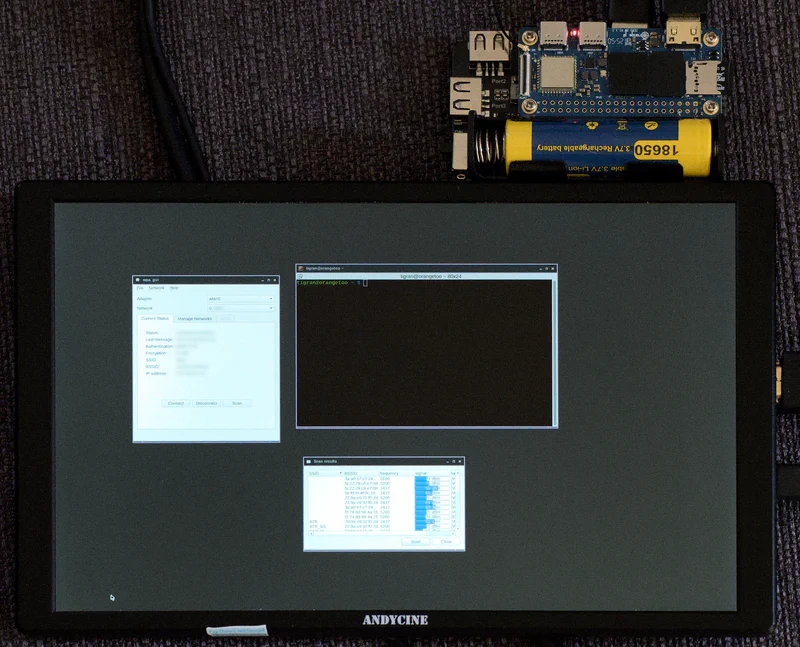
Orange Pi Zero 2W, with ANDYCINE N10